
Halfcycle vs Replit: a Replit alternative for software you own
Both turn a description into working software. They are built for different purposes and different people, they give you different levels of control, and they leave you with different things at the end.
-
Free for solo developers
The whole process and every check, at no cost. The agents run on your own Claude or OpenAI account.
-
More features, more control
A whole team of AI agents, a written plan, every piece reviewed and the app tested. Your code, your choice of tools, live wherever you choose.
-
Built for production from day one
Planned with a real architecture, built with what suits the project, and put live on hosting chosen for how many people will use it.
Replit is an online workspace for building software, and its AI agent, Replit Agent, turns a plain-language idea into a working app, sets up the database and logins, and publishes it, all inside Replit. It sits in the same family as Lovable, Bolt and Base44. Halfcycle is a Replit alternative for software you own: a team of AI agents plans, builds, checks and tests it inside Claude Code or OpenAI Codex, and the code stays in your own repository.
At a glance
| Feature | Replit | Halfcycle |
|---|---|---|
| Cost | A free plan with a daily agent allowance and one published app; Core $20 a month and Pro $100 a month, with agent work charged by effort (prices change: check Replit's site) | Free for solo developers |
| What it is | An online workspace where an AI agent sets up, builds and publishes apps | A well-researched process that builds your software with a team of AI agents, using your own Claude Code or OpenAI Codex (OpenCode coming soon) |
| Made for | Turning an idea into a running app in one place, from first prompt to published | Anyone, developer or not, building software that has to last and needs real thought before it is built |
| Where you work | Replit's website or app | Your terminal and your Claude Code or Codex, in your own repository (the folder that holds your project's code) |
| Where the app lives | Published on Replit, billed by use | Anywhere you choose to put it live |
| Who owns the code | You can download it as a ZIP or push it to GitHub | You do, from the first line, in your own folder |
| Before anything is built | Plan mode discusses the work and suggests a task list in the chat without changing files | It asks the questions a software team would ask, then writes down what to build and how, and has that checked |
| Deciding how much process a job needs | Yours: you choose when to switch to Plan mode | Halfcycle's: it sizes each change from the parts it touches and tells you why, from a quick one-session fix to the whole team, or a quick prototype when you ask for one |
| Checking the work | The agent can open the app in a real browser, click through it and fix what it finds; its docs describe no separate review of the code by another agent | Each piece is checked by a different agent before it is added, and another agent clicks through the finished app in a browser, the way a person would |
| Software you already have | Imports GitHub repositories, without their secrets or data | Reads your existing code and carries on from where it is |
| Database, logins, hosting | Included: Replit's database, Replit Auth and publishing | Recommended for your project, then set up as part of the plan, with step-by-step guidance |
| Logins for your users | With Replit Auth, your users sign in with Replit accounts on a Replit-branded page | Whatever suits your project and your users |
| Documents you keep | Its docs describe the plan appearing in the chat, not documents saved to the project | A product spec, the architecture, the phases and a design for every component, saved in your repository |
| Watching progress | The workspace, with a live preview of the app | An online console: progress, the team of agents and what each is doing, the live build, and a diagram of your system |
| Learning from other projects | Not described in Replit's docs | When a project goes wrong in a new way, what caused it and what fixed it both reach your project automatically |
| Coding needed | None | None. You answer its questions in plain language; you need Claude Code or OpenAI Codex installed |
| The AI itself | Charged by how much work each request takes | Runs on your own Claude or OpenAI account, as part of your normal usage |
The real difference: how it gets built, and what you keep
Most comparisons of AI app builders count features. Two questions matter more: who thinks about what could go wrong before it is built, and what you hold when the building stops.
Replit
- You describe the app in Replit
- Replit's agent builds it and tries it out in a browser
- It is published on Replit, with Replit's database and logins. The code can be downloaded; the data and user accounts stay with Replit
Halfcycle
- You say what you want, in plain words
- It asks what a software team would ask, then writes the plan
- A team of AI agents builds it, piece by piece
- Another set of AI agents checks each piece; another agent clicks through the finished app in a browser
- Your own code, yours to keep and put live wherever you choose
Replit is a workspace and a host in one. Its agent writes the code, sets up a database, adds logins and publishes the app, and you pay as the agent works and as the app runs. The code itself can leave: you can download it or push it to GitHub. What does not leave with it is the rest of the app. The data sits in Replit's database, and if the agent added Replit Auth, your users have signed in with Replit accounts on a Replit-branded page. Its docs say the agent is the only way to add Replit Auth.
The bigger difference is how the work is done. Replit gives you one capable agent. Halfcycle gives you a team, each with a different job, and a plan they all work from.
Halfcycle is not a platform. It works inside Claude Code or OpenAI Codex on your own computer and works like a software team made of AI agents. Before anything is built, it asks the questions a product owner, an architect and a senior engineer would ask, and writes down the answers as the plan. Then a team of AI agents builds the software piece by piece, another set of AI agents check every piece, and the finished app is tested. What you end up with is ordinary code in your own folder, built with whatever suits the job, that you can put live anywhere.
What Replit does well
Replit is good at a lot, and some of it Halfcycle does not try to do.
- Everything in one place. Writing, running, storing data, logins and publishing all happen inside Replit. Halfcycle does not host apps; it recommends where yours should run and helps you set it up.
- It tries the app itself. The agent can open the app in a real browser, click through it the way a person would and fix what it finds. Halfcycle does this too: when a phase is finished, an agent that built none of it clicks through the live app in a browser, the way a person would, and sends back what it finds to be fixed.
- A plan when you want one. Plan mode talks the work through and suggests a task list without touching your files. Halfcycle does this too, without you having to ask: it works out whether a change needs a plan, and when it does, writes the product spec, the architecture and a design for each part into your repository.
- It takes existing projects. You can import a GitHub repository and carry on. Halfcycle does this too: it reads the code you already have, tells you what it worked out and what it is unsure of, and carries on from there.
- A free plan to try it, with a daily agent allowance and one published app. Halfcycle does this too: it is free for solo developers.
Where Halfcycle differs is around the building: questions sized to the job, the plan and designs written down, and a second agent reviewing every piece of code before it is added.
Replit's limits: cost, logins and what moves with the code
What people ask before building something they need to keep on Replit. The answers come from Replit's own pricing page and docs.
How does Replit charge for the agent?
By effort. Each request costs according to how much work it takes, so a small fix costs less than a new feature, and Plan mode can cost something even when it changes no code. Published apps are charged by use as well. Replit asks before a paid action starts, but the total depends on how the build goes, which makes it harder to know in advance.
Can you take a Replit app somewhere else?
The code, yes: download it as a ZIP or push it to GitHub. The rest needs work. The data lives in Replit's database, not in the code, so it has to be moved on its own, and Replit Auth is built on Replit's own services, with users signing in through their Replit accounts. Its docs describe it working on Replit's own addresses and your custom domains, and point to a different login service for accounts not tied to Replit.
Does the agent review its own code?
It tests the app: it clicks through it in a browser and fixes what breaks. Halfcycle does that too. Its docs describe no separate agent reading each piece of code against a plan before it is added, which is where problems that do not show on screen are found. Halfcycle has one.
Where Halfcycle is the stronger choice
The examples below come from a real project we built with Halfcycle: Hookbox, a small service that receives payment notifications from Stripe and keeps them safe, so that none get lost if the system that should handle them is down.
You don't need to know how big the job is
Most people can't tell whether what they are asking for is a five-minute tweak or a week of work, and they shouldn't have to. Halfcycle works it out for you. Before it touches anything, it looks at which parts of your software the request affects, then tells you which of three ways it will go, and why:
- A small change, like new wording on a button or a fix on one screen, goes straight through in one session. No plan to approve and no documents to read. It is still reviewed twice by an agent that did not write it, and tested.
- A change that reaches across parts, like adding an age field that the form, the server and the stored data all need to know about, gets a short plan for you to approve and a check of the result.
- Something bigger, a new product or a major feature, gets the whole team: the questions, the full plan, the designs, the build and the tests, unless you have asked for a quick prototype first.
If a small change turns out bigger than it looked, it moves itself up to the right path and tells you. You can ask for more care on anything, and it won't skip a step a change needs. So quick things stay quick, and you only sit through the questions when the work calls for them.
And if all you want right now is a quick prototype, say so. Halfcycle builds a quick version to try, and when it suggests where the data, the logins and the hosting should live, it picks options that take minutes to set up rather than days. If the prototype proves itself, the same project carries on with the full process from there.
It finds the problems before anything is built
An app builder starts building from your description. Halfcycle starts by working out what you are really building. It asks one question at a time, gives a recommended answer and the reason, and raises the problems you would not know to look for. On Hookbox it found six of them before a single line of code was written.
One is shown below. Hookbox was meant to let you resend a payment notification later if it had failed the first time. But Stripe's notifications carry a time stamp that expires after five minutes, so a resent one would have been rejected as fake. Halfcycle spotted it, explained what each fix would cost, and recommended one.
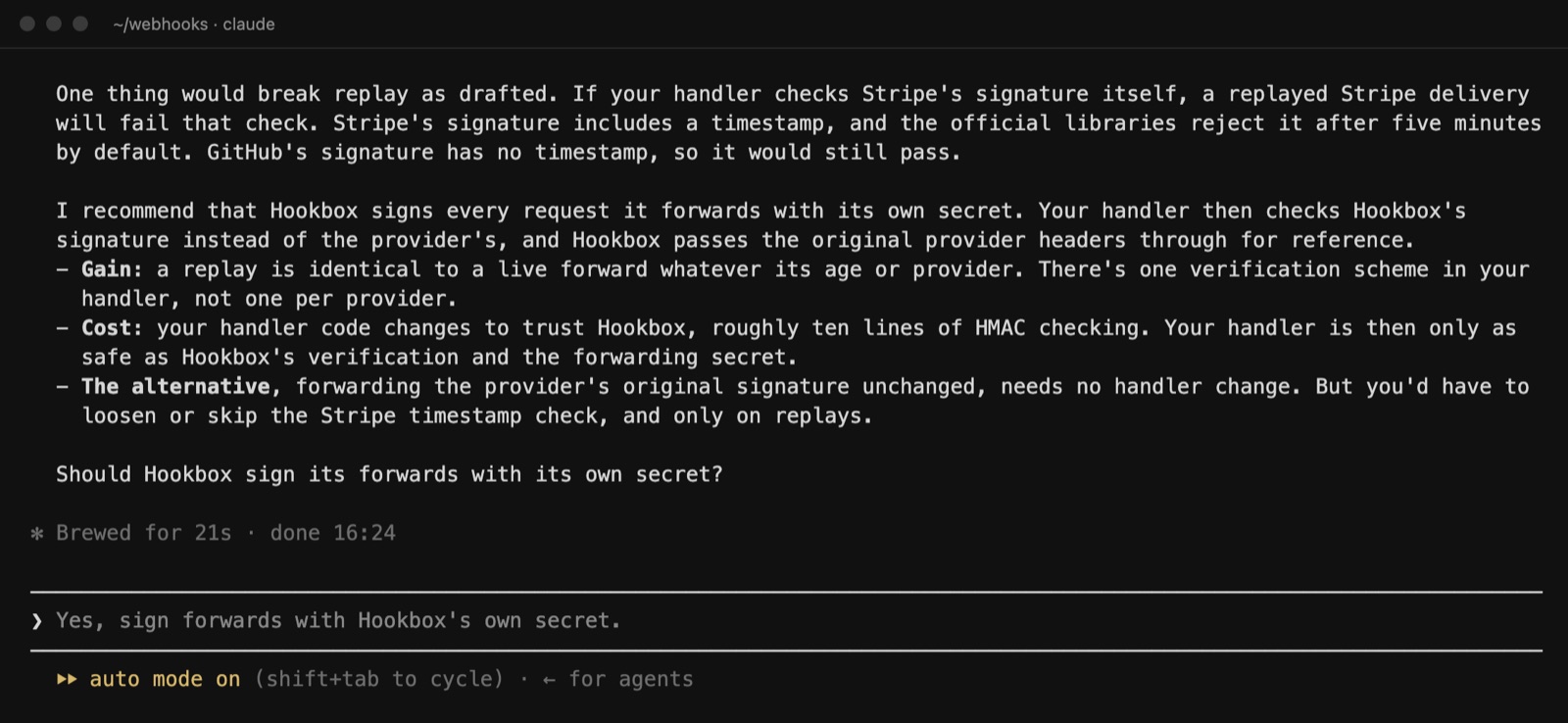
The others included Hookbox quietly switching off Stripe's own resending, a goal nobody would have been told was failing, and whether to build it at all instead of using an existing tool. Replit's Plan mode suggests how to do what you asked; questioning whether you asked for the right thing is not what it is built for.
It knows more with every project, yours included
Halfcycle keeps learning. When a software project goes wrong in a new way, two things are kept: what caused it, and what fixed it. Both reach every other project automatically, with nothing for you to download or update.
For you, that means two things. Most of the problems other projects have already run into never arrive on yours at all. And the ones that do arrive come with the fix already known, because somebody has already found it. The more projects it works on, the longer that list gets.
What travels between projects is the shape of a problem, never your code or your documents, and we do not train on your work.
You get the documents a software team would write
A good software team writes things down before it builds, so that everyone, people and agents alike, works from the same picture. Halfcycle does the same, and every document is saved in your own repository as a plain file you can read, change and keep:
- The product spec. What you are building, who it is for, what success looks like, and the options you turned down and why.
- The architecture. The parts of the system and how they connect, with a diagram, plus the rules the system must keep to.
- The phases. The work cut into stages small enough to finish, with the riskiest part first and what "done" means for each.
- A design for every component in the phase. What each part does, how it behaves, and how anyone can check it works.
- The build plan and its record. Every task, who built it, who checked it, and what they found.
On Hookbox that came to a product spec, an architecture overview, three phase plans and seven component designs, among others. The agents read them at the start of every session, which is why the tenth task fits the first. Replit's docs describe Plan mode's ideas and task list appearing in the chat. They do not describe a product spec, an architecture or component designs saved as documents you keep.
docs/
├── product-spec.md            what it is, who for, what success looks like
├── architecture-overview.md   the parts, how they connect, the diagram
├── phases/
│   ├── poc.md                 the first phase and what "done" means
│   ├── phase-1.md
│   └── phase-2.md
├── features/                  one design per component
│   ├── stripe-receive.md
│   ├── delivery-store.md
│   ├── signed-forwarder.md
│   ├── inbox-minimal.md
│   └── …
└── build-records/ every task, every reviewA team of AI agents builds, another set of agents checks, and another agent tests
Once the plan is agreed, Halfcycle splits it into tasks in the order they can be done and hands them to a team of AI agents with different jobs, the way a real software team splits the work. Every one of them is an AI agent except you. Analyst and architect agents question the idea and design the system. Builder agents write the code, each on its own copy. A separate set of reviewer agents checks every piece before it is added to the project, and a tester agent checks the tests and runs quick checks that the finished app works. Two lead agents run the team. You approve the plan and accept the result.
When a phase is finished, one more agent, one that built none of it, opens the live app in a browser and walks through it the way a person would: signing in, clicking through each journey the phase was for, and checking what appears on screen. Anything it finds goes back to the team to fix, and the journeys are walked again until nothing is left in the way.
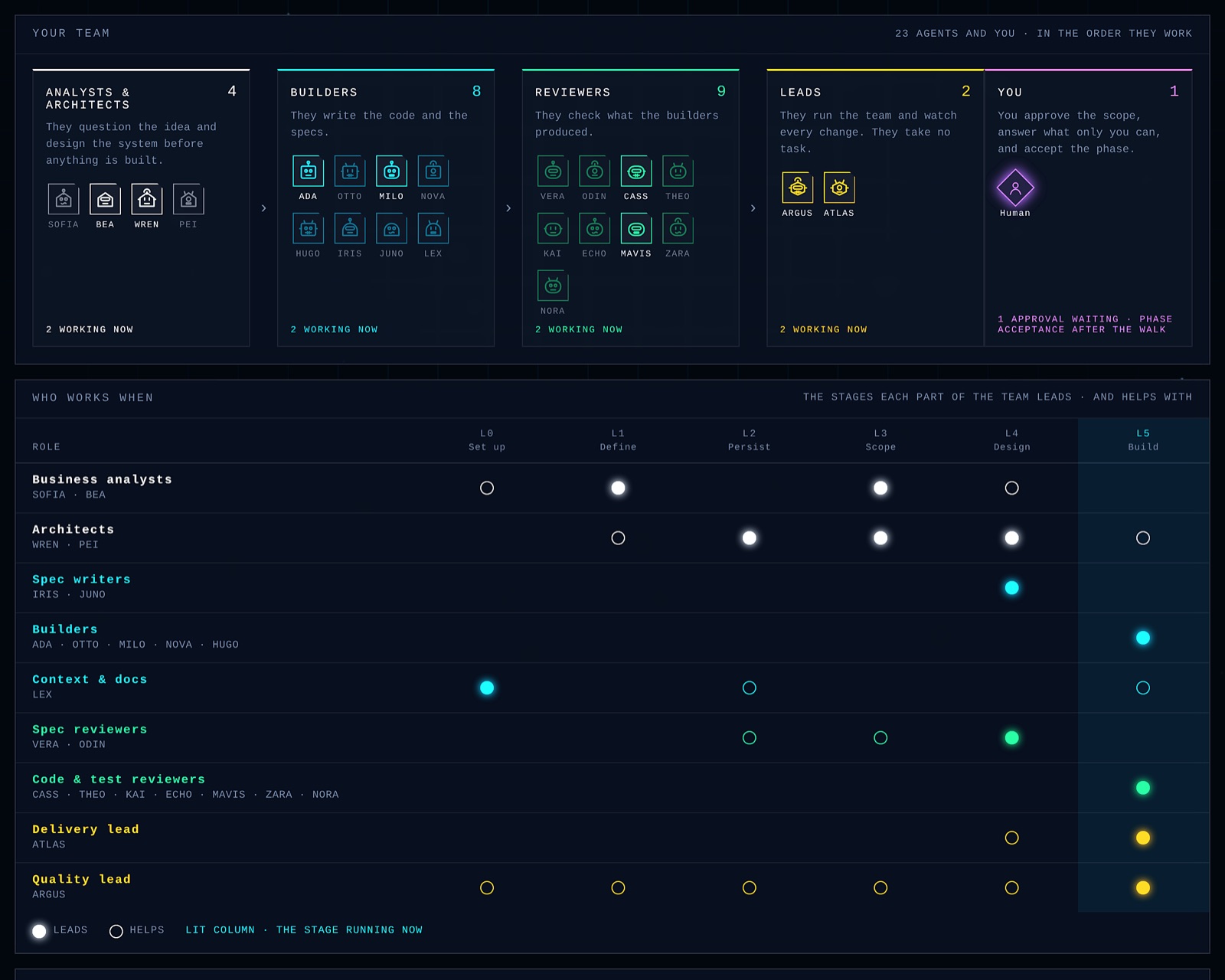
On Hookbox one check failed: the part that receives Stripe's notifications was tested with sample data that was missing something the plan required. It was fixed, checked again by a third agent, and passed. Two hours and eleven minutes after the building started, every task that did not need a person was built, checked and added. It stopped where it should, at the jobs only a person can do, like creating the Stripe test account, each with step-by-step instructions already written.
Security is planned in from the start
When software built with AI has a security hole, it is rarely one bad line of code. More often it is a gap between parts: a rule about who can see what, applied on one screen and missing from the next, or a test login quietly standing in for a real one. Halfcycle is built around those gaps.
- Who can sign in, and what each kind of user may see and do, is written into the plan once. Every part built afterwards has to follow it, and the reviewer agents check each piece against it.
- A missing login or secret key makes the app stop with an error, so a stand-in login cannot slip into the live app looking like a real one.
- How secret keys are kept is settled when the project is set up, and the project is checked against it, so keys do not end up in your code.
- The finished app is walked by an agent really signed in, on the live version, not on a test copy with the doors left open.
So security is part of how your app is designed and built, from the first plan to the live version, rather than a scan at the end that looks for holes once they are already there.
A console to watch your project being built
Every Halfcycle project gets an online console: a web page where you, or anyone you invite, can see the whole project without opening a terminal. Replit shows you the app itself in its workspace as it is built. The console shows you the work behind it: the plan, the team of agents, the system and the progress.
Where the project stands
The overview shows each stage of the work, what was approved and when, and any problem the checks found in the code. The first one on Hookbox was a line of code that updated a record nothing had ever created, so it would have quietly done nothing at all.
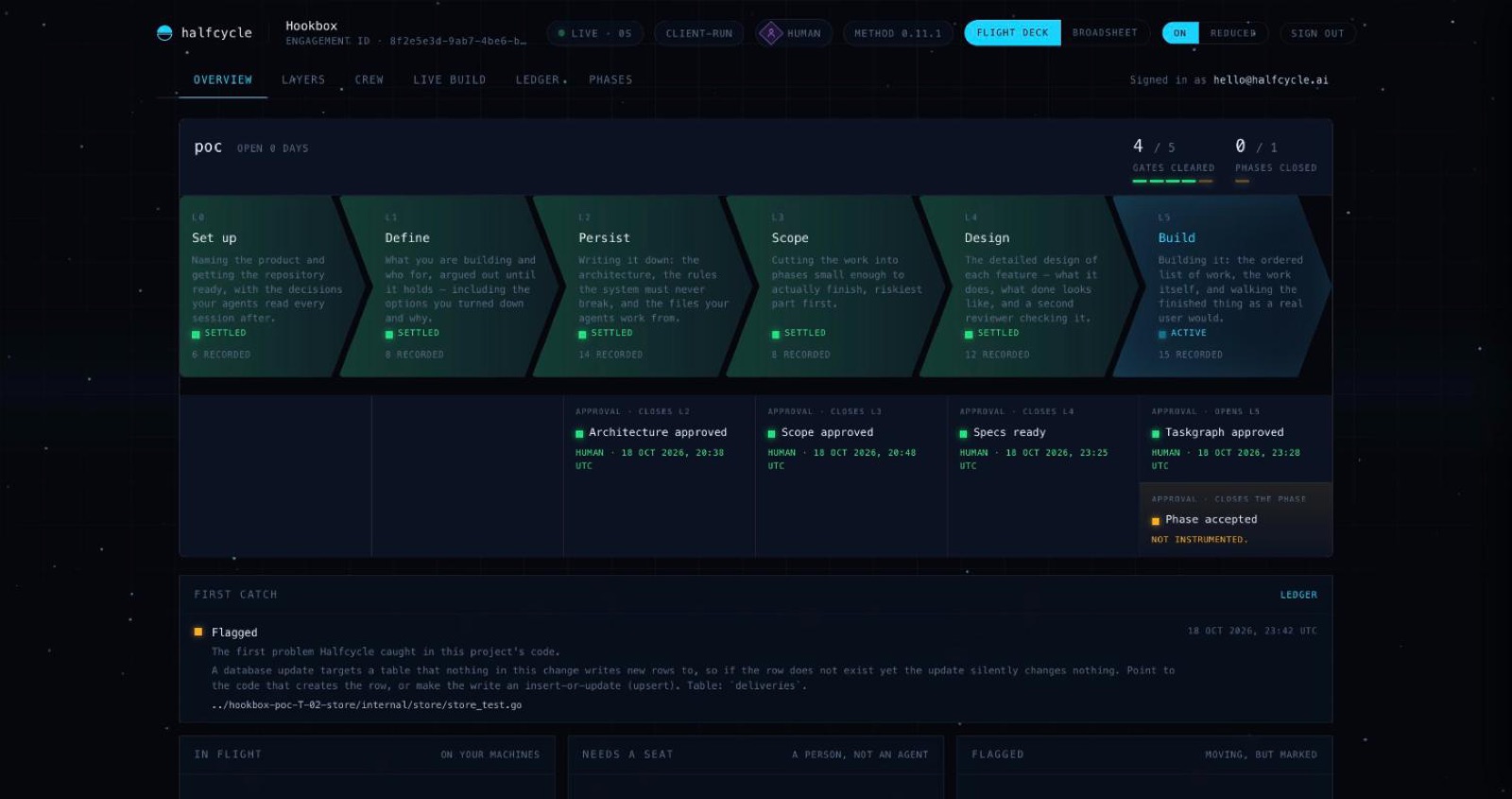
The system design, and what each phase changes
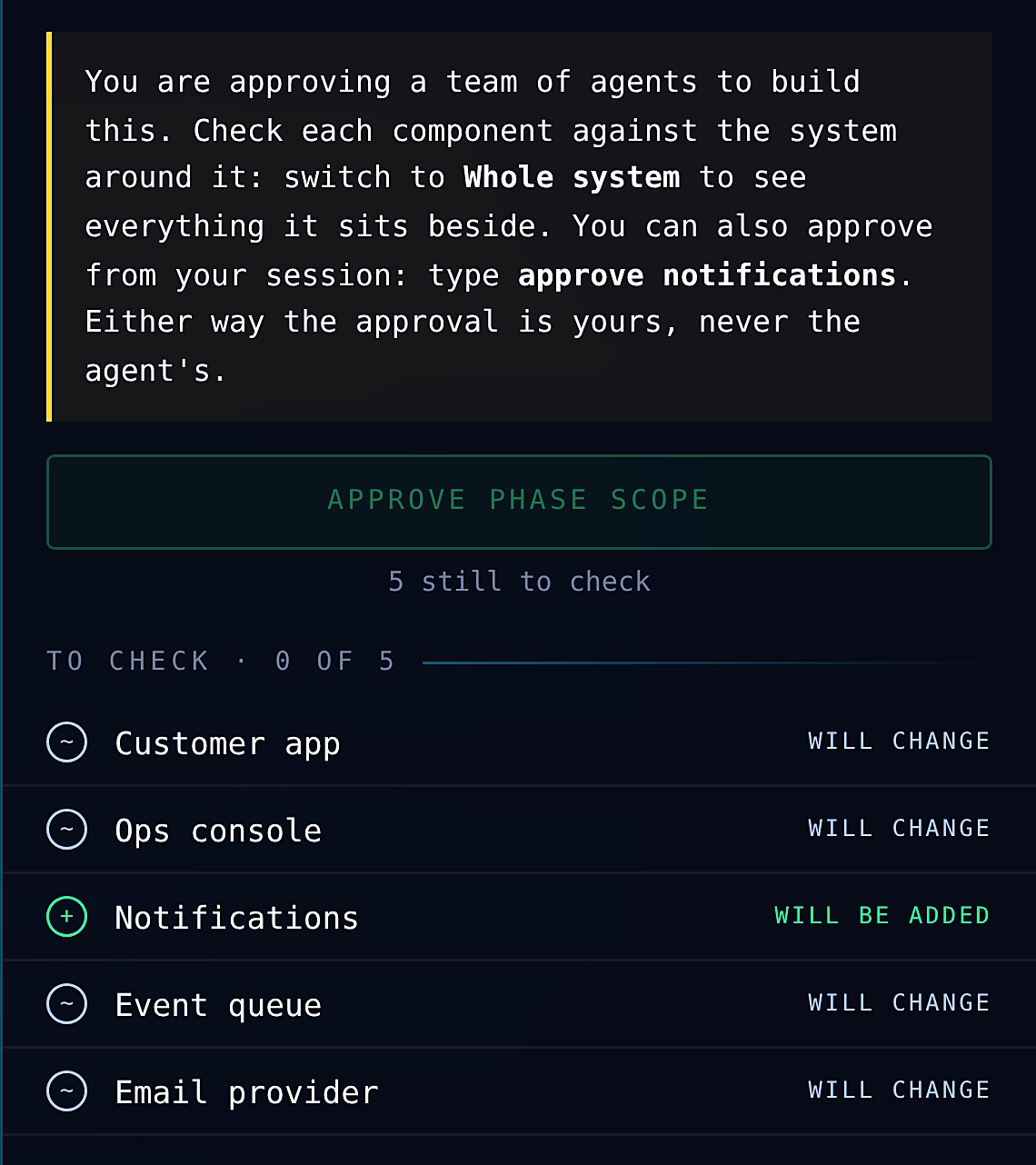
The system view draws your whole product as a diagram: the apps people use, the services behind them, the data and the outside services, with a card for each part. Before a phase is built you see exactly which parts it will add or change, and you approve them one by one. While it is being built, each card shows whether that part is built and checked, in progress, waiting for a person or blocked. It also shows two things that usually only come out at the end: a part that changed though the plan did not include it, and a part the plan needs that no task is building.
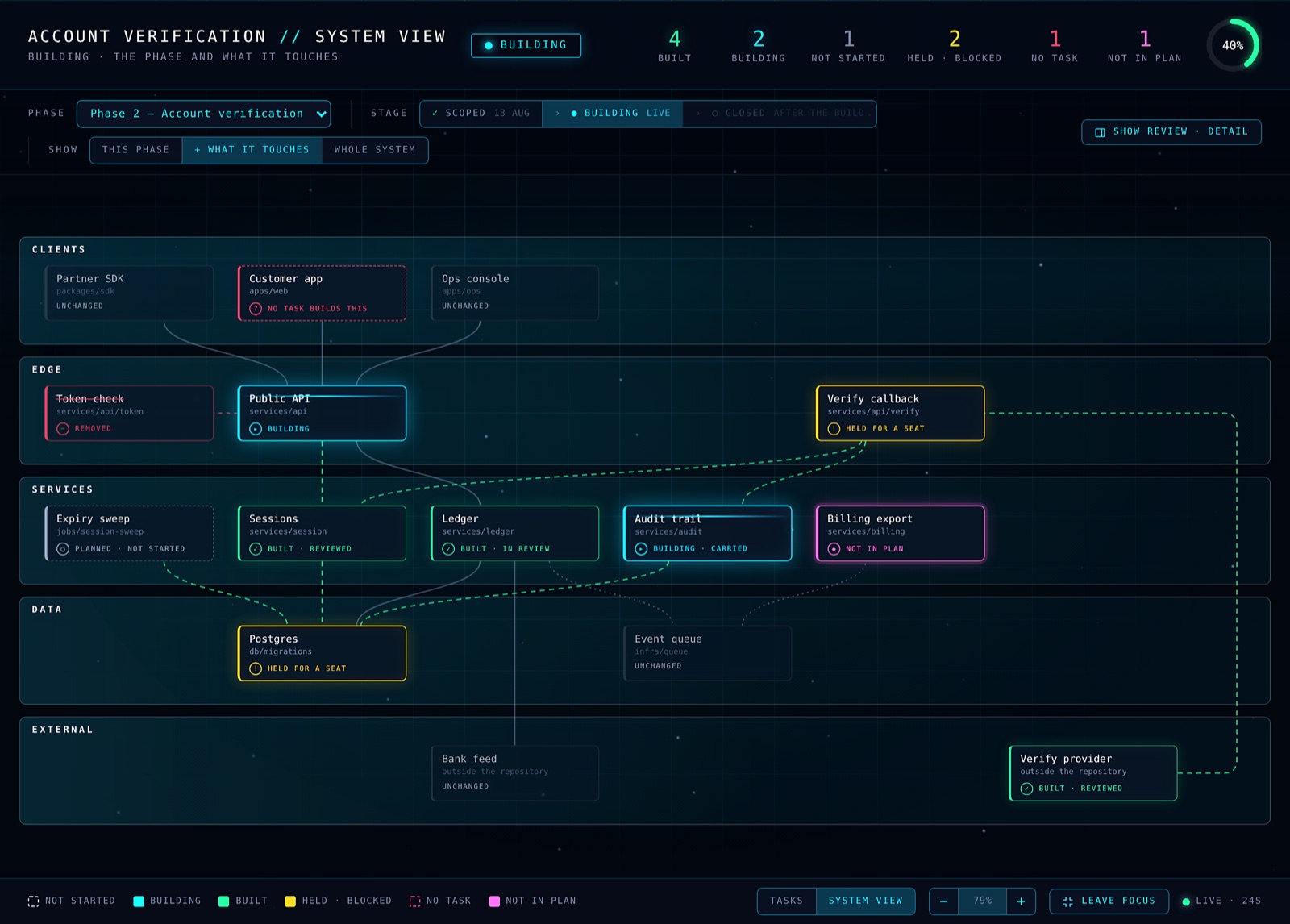
You approve each change before it is built
No agent builds a phase until you have approved it, part by part. The console lists every part of your system the phase will add or change. You check each one against the system around it, mark it Looks right or ask for a change in plain words, and the approve button stays off until every part is checked. You can approve from the console or by typing it in your coding agent; either way the approval is recorded as yours, with the time, never the agent's. If the plan changes after you approve, your approval is not carried over: only the parts that changed come back to you.
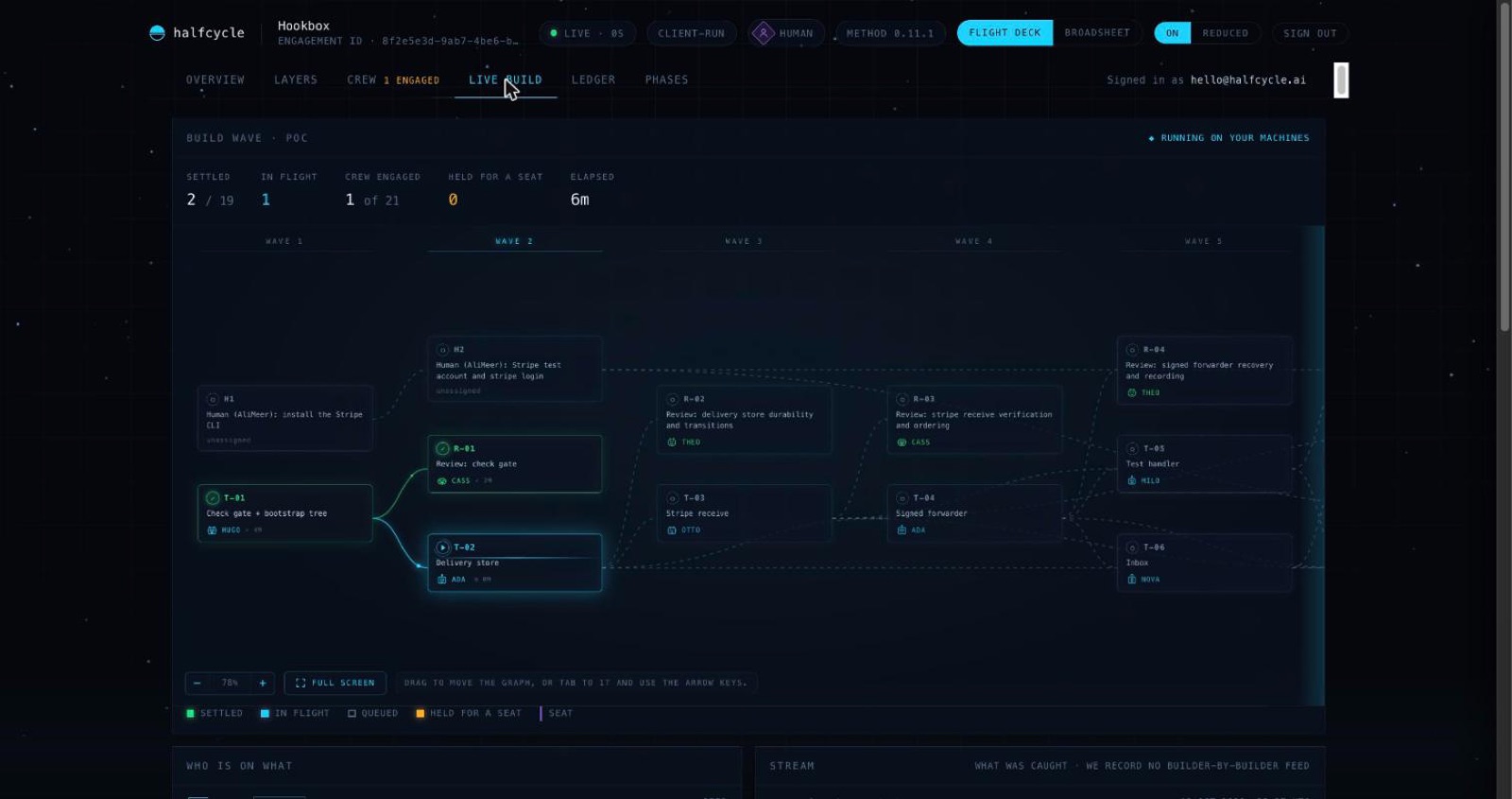
The live build, task by task
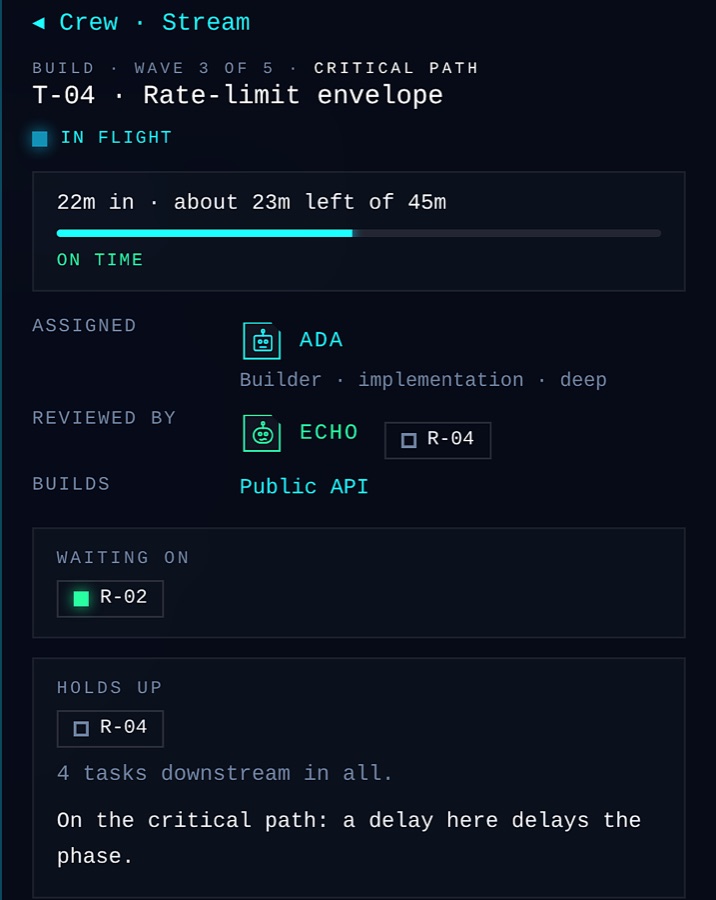
The live build shows the phase as waves of tasks, with the agent working on each one, what has passed its check, and what is waiting for a person. Open any task to see who is building it, who will check it, how long it has left, and what is waiting on it.
A record of every problem caught, and how
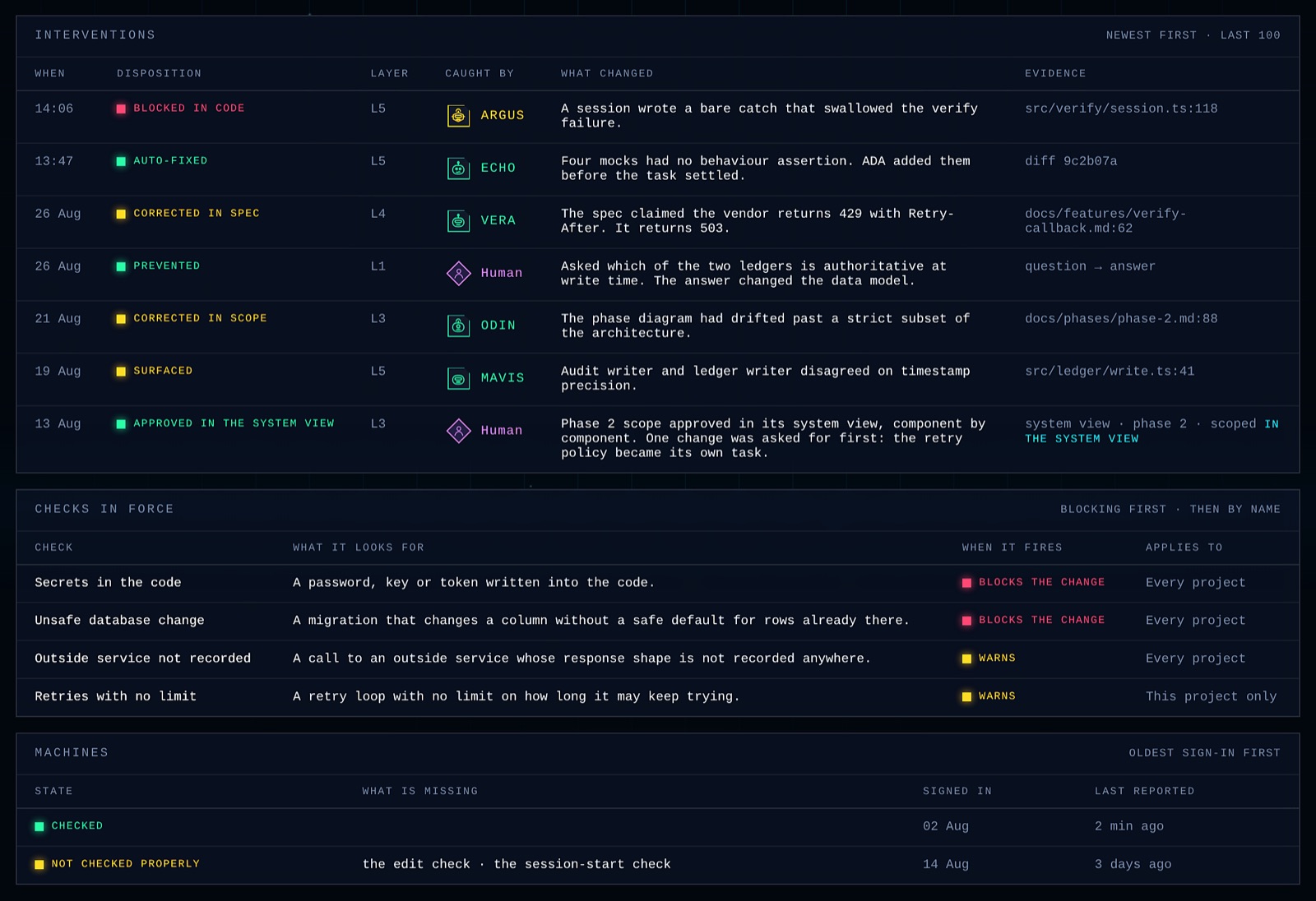
The ledger lists every time something was stopped or corrected: a change blocked in the code, a mistake fixed before the task closed, a claim in the plan corrected, a problem prevented by a question you answered. Each one says what changed, which agent or person caught it, and the file or answer that proves it. Below it are the checks in force on your project, what each looks for and whether it blocks or warns. The Phases page keeps each phase's dates, approvals, defects found in testing and outcome.
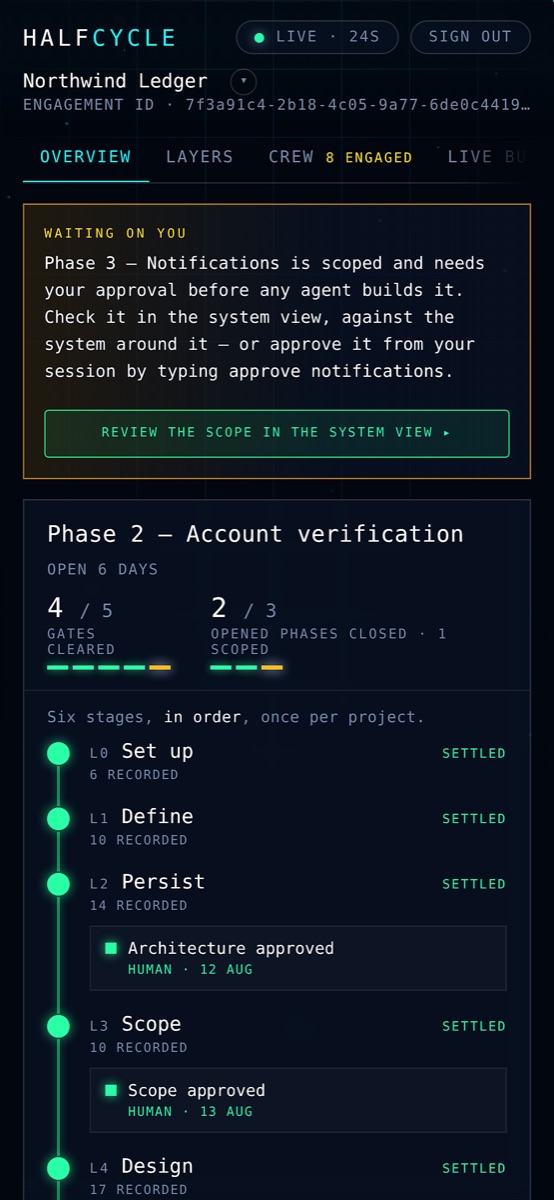
On your phone too
The console works fully on a phone, so you can see where a build has got to, and what is waiting for you, without being at your desk.
It carries on from the software you already have
Replit can import a GitHub repository too, without its secrets or data. Halfcycle reads your existing code, tells you what it worked out and what it is unsure of, and plans the next piece of work from there.
When Replit is the simpler choice
Halfcycle can have an idea working today as well. The difference is where it ends up. Replit writes, runs and publishes everything inside one website; Halfcycle leaves the code with you, so going live is one more step, on hosting you pick, with Halfcycle's guidance. If having everything in one place matters more than owning where it runs, Replit is simpler. Halfcycle asks a few questions first, even for a quick prototype, and it runs inside Claude Code or OpenAI Codex, so you need that installed, even if you never write a line of code yourself.
Can you use both?
Yes. Use Replit to try an idea and get it in front of people quickly. When it is worth building properly, push the code to GitHub, open it in Claude Code or Codex and carry on with Halfcycle. If the app uses Replit's database or Replit Auth, Halfcycle plans replacing them as a stage of its own, riskiest part first.
Pricing
Halfcycle is free for solo developers, with the full process and every check. The agents run on your own Claude or OpenAI account, so the building itself is part of your normal usage. Details are on the install page.
Replit has a free Starter plan with a daily agent allowance and one published app. Core costs $20 a month ($18 a month billed yearly) and Pro $100 a month ($90 billed yearly). Agent work is charged by effort on top of the allowance each plan includes, and published apps are charged by use. These are the figures on Replit's pricing page and in its docs on 30 October 2026. Prices and plans change, so check Replit's website for the latest.
Questions people ask
Is Halfcycle a Replit alternative?
For building software that has to last, yes. Replit's agent is one capable builder working in Replit's workspace; Halfcycle is a whole team of AI agents in your own Claude Code or OpenAI Codex, which asks the questions first, writes the plan and designs down, reviews every piece with a separate agent, and tests the finished app. If you want building, data and publishing all in one website, Replit is the better fit.
Can I move a Replit project to Halfcycle?
Yes. Download it as a ZIP or push it to GitHub, open it in Claude Code or Codex and run Halfcycle, which reads the code and plans from there. Plan for the parts that live on Replit: the data in its database, and your users' accounts if the app uses Replit Auth, since those users sign in with Replit accounts. Halfcycle makes replacing them a stage of its own.
Which is quicker for a first prototype?
Both can have an idea working today. Replit is a step shorter, because it publishes the app from the same place it builds it. Halfcycle can be quick too. Tell it you want a quick prototype and it builds one, suggesting a database and hosting that take minutes to set up. After that it sizes each change for you, so a small fix goes straight through in one session, reviewed and tested, with no plan to approve.
Does Halfcycle host my app?
No. While it plans the project it recommends where the app should run, with its reasons, weighing what the app needs and what it will cost. You decide, and setting it up becomes a step in the plan with instructions written for you. Replit publishes apps on its own platform and bills by use.
Do I need to know how to code to use Halfcycle?
No. You need Claude Code or OpenAI Codex installed and open, and Halfcycle does the rest in plain language. It works out the next step, asks you only the questions you can answer, gives a recommended answer for each, and points out the gaps you did not know to ask about, technical or not.
To use Halfcycle, do I need to know what to do next and tell it?
No. All you have to say is that you want to build something, and describe it in plain language. If you are not sure what to describe, it asks you for the details, one question at a time, with a recommended answer for each. It acts as the architect if you are not one, and as the analyst if you are not one, and its agents write the code, check it and test it for you. At each step it works out what comes next, so you do not have to.
Does Halfcycle learn from other projects?
Yes. When a software project goes wrong in a new way, what caused it and what fixed it are both kept, and both reach every other project automatically. So most of those problems never arrive on your project, and the ones that do come with the fix already known. What travels between projects is the shape of the problem, never your code or your documents, and we do not train on your work.
Is my code sent to Halfcycle?
Your code stays in your own folder and the agents run on your own Claude or OpenAI account. The checks read what they need and keep only what they found, not your material, and we do not train on your work.
Try it on your next project
Halfcycle is free for solo developers, gives you more control than an app builder, and builds for production from day one. Three steps:
-
Have Claude Code or OpenAI Codex
Either one, on your own account. You also need Node 18 or newer. Don't have an agent yet? Claude Code, OpenAI Codex.
-
Run one command in your project folder
npx halfcycleIt signs you in through your browser. Starting from nothing? Make an empty folder and run
git initin it first. On Windows PowerShell, typenpx.cmd halfcycle. -
Open the folder and say what you want to build
Claude Code: trust the folder when asked, choose to use the halfcycle server, then type what you want, in your own words.
Codex: trust the folder, type
/hooksand approve the Halfcycle entries, then type$halfcycle-setup.Halfcycle asks what it needs and tells you each next step.
Sources: Replit pricing, plans, agent billing, Plan mode, app testing, Replit Auth, projects and files and import docs, checked 30 October 2026. Halfcycle details are from our own Hookbox build of 18 October 2026. If anything here about Replit is out of date, tell us and we will correct it.
This comparison is written by Halfcycle and reflects our reading of Replit's public website and documentation on 30 October 2026. Replit changes its features and prices, so check replit.com for the latest before you decide. Replit are trademarks of their owners and are used here only to identify their products. Halfcycle is not affiliated with, endorsed by or sponsored by Replit.